

Appearance
SMS
Send transactional text messages next to the emails Shopware already sends — order confirmation, shipping notification, password reset, any event you build a flow for — through the SMS provider that serves the customer's country best.
Install · Configure · Create a template · Add to a flow · Troubleshoot · Developer docs
| Version | 0.9.0-beta.1 · Beta |
|---|---|
| Shopware | 6.6, 6.7 |
| PHP | 8.2+ |
| Plugin name | KommandhubSmsSW |
| Composer package | kommandhub/sms-sw |
| Licence | Apache-2.0 |
| Get it | Packagist (Composer) or ZIP upload |
What does it do?
The plugin adds a Send SMS action to Shopware's Flow Builder and an SMS templates screen. You write a message per Shopware email type, add Send SMS to the flows you want, and customers receive a text alongside the email. Messages go out through Termii, Sendexa, Africa's Talking or Twilio, with automatic fail-over.
Who it is for: shops whose customers expect SMS updates — common where email is read less than text messages.
How it fits into Shopware: templates are tied to Shopware's email template types, sending is triggered by Flow Builder, and delivery runs on Shopware's message queue.
What it looks like
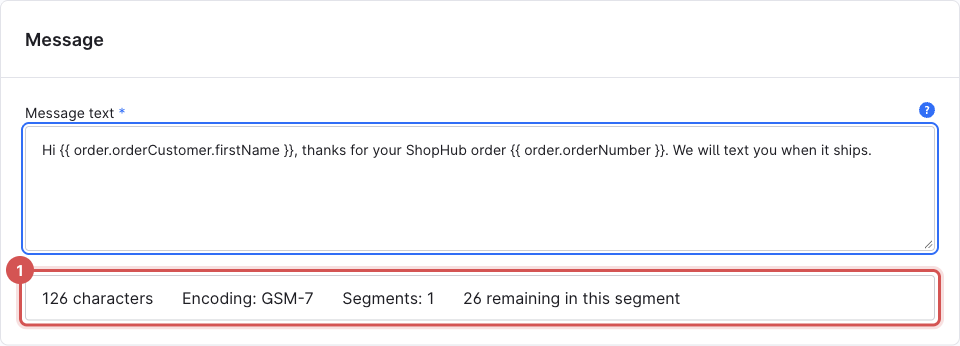
You write an SMS template once in the Administration…
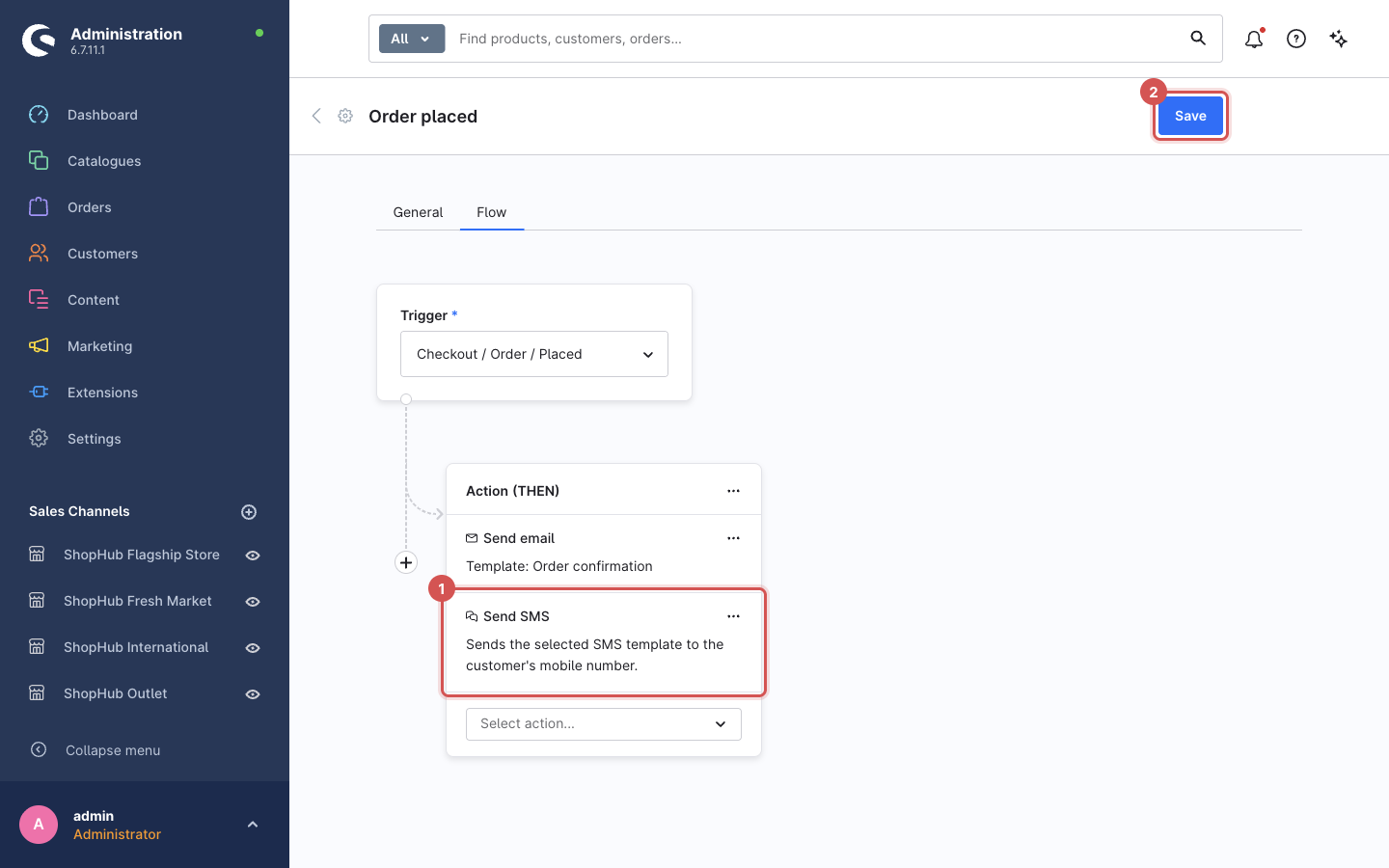
…add it to a flow next to the email Shopware already sends…
…and your storefront asks customers for their number with the right country code:

Key features
- Send SMS Flow Builder action — an extra channel next to Send email, never a replacement.
- SMS templates per event and language, with Twig placeholders such as
{{ order.orderNumber }}. - Live cost counter — characters, encoding and billed segments; warns when an emoji or curly quote switches to Unicode.
- Four providers — Termii (West Africa), Sendexa (Ghana), Africa's Talking (East Africa), Twilio (international).
- Routing and fail-over — your default provider first, then providers with direct routes to the destination country, then the rest.
- Send test message with sample data and a precise failure reason.
- Country dial-code selector on storefront phone fields.
- Never breaks a flow — customers without a usable number are skipped and logged; the email still goes out.
- Delivery reports from Termii are received and logged.
Requirements
| Shopware | 6.6 or 6.7 |
| PHP | 8.2 or newer |
| SMS provider | An account with at least one of Termii, Sendexa, Africa's Talking or Twilio, with an approved sender ID (Twilio: a sending number) |
| Message queue | A running queue worker in production — SMS are sent in the background |
| Phone numbers | The phone field switched on under Settings → Log-in & sign-up — it is off by default |
Quick start
composer require "kommandhub/sms-sw:^0.9@beta", then activate — Installation.- Configure one provider and the Default country dial code — Configuration.
- Switch on the phone field under Settings → Log-in & sign-up — Phone numbers.
- Create an SMS template for Order confirmation and Send test message to your phone — Create a template.
- Add Send SMS to the Order placed flow and save the flow — Send SMS from a flow.
- Place a test order — the SMS arrives once the queue worker processes it.
Important limitations
- No templates ship with the plugin, and no provider is pre-selected — nothing is sent until you set both up.
- The role permission SMS for Shopware 6 → Manage does not currently grant access; only administrators can manage templates.
- The template Sender ID field is not applied; the provider's sender from the settings is used.
- Delivery reports are supported for Termii only.
All known issues: Troubleshooting → Known issues.
Documentation
For shop owners and administrators
- Installation — step-by-step with screenshots: install, phone field, queue worker, provider, first template, first flow, update, uninstall
- Configuration — every setting
- Create an SMS template · Send SMS from a flow · Phone numbers & dial codes · Providers & routing
- Troubleshooting · FAQ
For developers
- Architecture & queue — send pipeline, message queue, data model, adding a provider, using the gateway, testing
- HTTP endpoints & webhooks
- Changelog
Shopware resources
- Flow Builder · Email templates · Users & permissions
- Developers: Message queue · Flow Builder extensions
Support
info@kommandhub.com · kommandhub.com/support. Sender-ID approval, credit and delivery on the carrier side are handled by your SMS provider.