

Appearance

The Shopware Shipbubble integration by KommandHub. Show live Shipbubble courier prices at checkout, book the customer's courier from the order, email tracking links and keep the delivery status up to date — all on your own Shipbubble account.
Install · Configure · Customer checkout · Shipments & flows · Troubleshoot · Developer docs
| Version | 1.0.4 · Stable |
|---|---|
| Shopware | 6.7 |
| PHP | 8.2+ |
| Plugin name | KmhShipbubbleSW |
| Composer package | kommandhub/shipbubble-sw |
| Licence | Apache-2.0 |
| Get it | Packagist (Composer) or ZIP upload |
 Shipbubble developer partner
Kommandhub builds and supports this plugin as a Shipbubble developer partner; Shipbubble and its logo are used with permission. You need your own Shipbubble account: courier bookings, fees and your wallet balance are between you and Shipbubble, so contact Shipbubble about those and us about the plugin.
What does it do?
The plugin adds the shipping method Courier delivery (Shipbubble). When a customer chooses it, checkout asks Shipbubble for live prices to the customer's address and lists the couriers that deliver there — with logo, delivery estimate and price. The customer picks one; the price comes from the plugin's own Shipbubble quote, never from the browser.
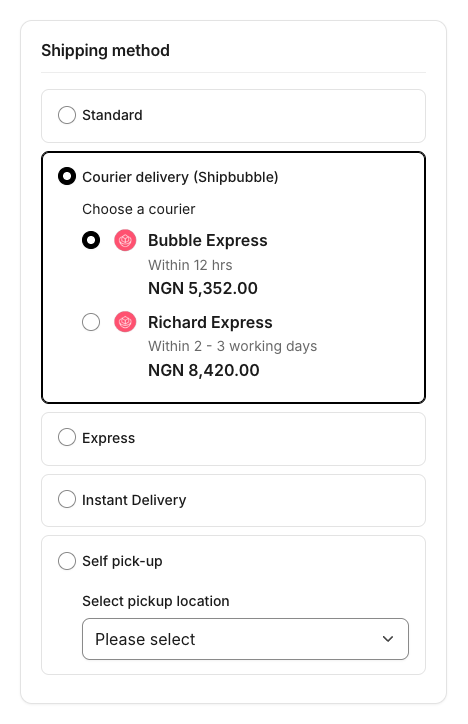
When the order is paid, an installed flow books that courier at Shipbubble. The customer gets a tracking email, the order shows a Shipbubble card with the tracking link and waybill, and Shipbubble's status updates move the order's delivery status by themselves.
Who it is for: Nigerian Shopware shops that sell in naira (NGN) and want door-to-door delivery through the couriers on Shipbubble.
How it fits into Shopware: it is an ordinary shipping method. Tracking uses the order delivery's tracking codes, delivery status changes use Shopware's own delivery states, and emails are sent by Flow Builder flows the plugin installs.
Key features
- Live courier prices at checkout — logo, delivery estimate and price per courier, plus your optional markup. Quotes are cached per cart and address; changing a quantity or the address re-quotes.
- Checkout never breaks — when an address can't be priced, the customer sees why and picks another method. An optional fallback price applies when Shipbubble can't be reached.
- Shipbubble card on the order — courier, prices, status, tracking link, courier tracking number and waybill, with Create shipment, Refresh status and Cancel shipment.
- Booked automatically when paid — or by hand from the order. If the checkout quote can no longer be used, you confirm the new courier price first; the customer's shipping price never changes.
- Tracking — the Shipbubble order id becomes the order's tracking code, linked to Shipbubble's tracking page in the customer account and in emails.
- Status updates by webhook — picked up, in transit, delivered, returned, cancelled; verified with your API key, processed in the background.
- Five ready-made, active flows — no manual Flow Builder setup.
- Settings per sales channel — sandbox or live, Test connection, sender address validation, couriers, package category, default weight and box, markup, fallback price.
- Order permissions for viewing and editing Shipbubble shipments. English, German and French.
Requirements
| Shopware | 6.7 |
| PHP | 8.2 or newer |
| Shipbubble | An account with API keys (app.shipbubble.com) and money in your Shipbubble wallet for live bookings |
| Currency | NGN on the sales channel — Shipbubble quotes in naira |
| Addresses | A phone number in the customer's shipping address |
| Products | Weights in kg (products without one use the default weight) |
| Your shop | Reachable on a public domain, so Shipbubble can deliver webhooks |
| Worker | A running message queue worker — webhooks are processed in the background |
Quick start
- Install and activate — Installation.
- Choose Sandbox, paste your Shipbubble sandbox key, Save, click Test connection — Configuration.
- Copy the Webhook URL from the settings page into the Shipbubble dashboard.
- Enter your pickup address, Save, click Validate sender address.
- Activate Courier delivery (Shipbubble) under Settings → Shipping — it is installed inactive.
- Place a test order in NGN and pay it: the courier is booked and the Shipbubble card fills in — Shipments & flows.
Important limitations
- NGN only. In any other currency the method shows "not available in this currency".
- One pickup address per sales channel — the sender in the settings. Multi-warehouse pickup is not supported.
- No cash on delivery through Shipbubble in this version. Your other payment methods are unaffected.
- Cancelling costs ₦150 and only works before pickup. Shipbubble refunds the label to your wallet minus a ₦150 fee; once the courier has the parcel, it can no longer be cancelled.
- A checkout quote is bookable for seven days at Shipbubble. The plugin re-quotes anything older than six days, so you confirm a new price instead of hitting an expired quote.
- Product dimensions are not used — the parcel is sized by weight.
All known issues: Troubleshooting → Known issues.
Documentation
For shop owners and administrators
- Installation — requirements, Store, ZIP or Composer, activation, what is created, verification, update, uninstall
- Configuration — every setting explained, with Test connection, webhook URL and sender validation
- Customer checkout — the courier picker, and what customers see when a delivery can't be priced
- Shipments, tracking & flows — the Shipbubble card, re-quotes, cancelling, tracking and the five installed flows
- Troubleshooting · FAQ
For developers
- Architecture & extension points — modules, quote and booking pipeline, Flow Builder events and action, data model
- HTTP endpoints & webhooks
- Changelog
Shopware resources
- Shipping · Sales channels · Currencies · Orders · Flow Builder · Email templates · Users & permissions
- Developers: Message queue · Flow Builder extensions
Support
info@kommandhub.com · kommandhub.com/support · GitHub issues. Questions about your Shipbubble account, wallet, courier fees or a parcel go to Shipbubble.