

Appearance
Last-Mile Delivery
Offer instant local delivery priced live from the driving distance, weight and size of each cart, add peak-hour, weekend, remote-area, bulky or fuel surcharges, and confirm every hand-over with a one-time delivery code or a proof-of-delivery photo.
Install · Configure · Price rules · Surcharges · Handle deliveries · Troubleshoot · Developer docs
| Version | 0.9.0-beta.2 · Beta |
|---|---|
| Shopware | 6.6, 6.7 |
| PHP | 8.2+ |
| Plugin name | KmhLastMileDeliverySW |
| Composer package | kommandhub/last-mile-delivery-sw |
| Licence | Apache-2.0 |
| Get it | ZIP upload, or Composer from the Git repository |
What does it do?
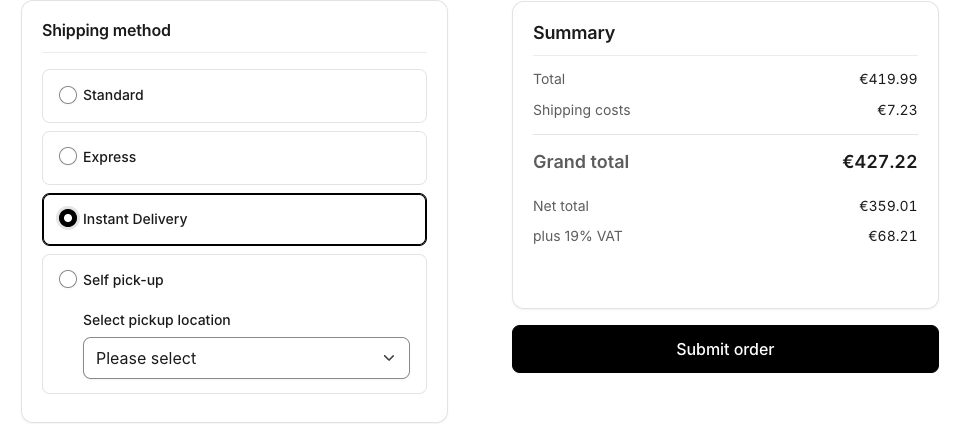
The plugin adds an Instant Delivery shipping method. When a customer chooses it, the plugin looks up the customer's address on a map, measures the driving distance from your fulfilment location, measures the cart (weight, volumetric weight, longest edge, item count, order value), picks the matching delivery price rule and adds any matching surcharges. The price appears in checkout and updates whenever the cart or address changes. If the delivery can't be priced, checkout is blocked with a clear message instead of charging a wrong or zero cost.
After the order is placed, your team sets the delivery status to In transit. The customer is emailed a one-time delivery code. The rider (or your staff) enters the code on the order — or uploads a photo of the hand-over — and the delivery is set to Shipped automatically.
Who it is for: shops that deliver locally with their own riders or a local courier and want to charge by distance instead of a flat rate.
How it fits into Shopware: Instant Delivery is an ordinary shipping method; scoping uses the Rule Builder; the In transit status extends the order delivery status; emails are normal email templates sent by Flow Builder.
There is no external courier API: all pricing happens inside the plugin. The only outside service is the map backend — Google Maps or OpenStreetMap — used to find the address and measure the driving distance.
Key features
- Instant Delivery shipping method, priced per cart; every other shipping method is untouched.
- Distance from a real map — Google Maps (Geocoding + Distance Matrix) or OpenStreetMap (Nominatim + OSRM). Only street-level addresses are priced.
- Delivery price rules under Settings → Shop → Delivery price rules — combine distance, total / volumetric / chargeable weight, longest edge, item count and order value; optional Rule Builder scope; prices per sales channel. Highest priority wins.
- Delivery surcharges under Settings → Shop → Delivery surcharges — fixed or percentage, stacked in priority order, limited by dates, sales channels, a rule, conditions and weekly time windows (which may cross midnight).
- Price breakdown stored with every order and shown on the order page.
- In transit delivery status and a delivery code (OTP) emailed to the customer, stored only as a hash.
- Delivery verification card on the order: enter the code, resend a new one, attach a proof-of-delivery photo.
- Automatic Shipped once the evidence you require is present: code only, photo only, both, or either.
- Flow Builder triggers for code generated, in transit and delivery confirmed, with two ready-made email flows.
- Own permission Last-Mile Delivery → Manage for staff.
Requirements
| Shopware | 6.6 or 6.7 |
| PHP | 8.2 or newer |
| Database | MySQL 8.0+ or MariaDB 10.11+ (as stated in the plugin README) |
| Map backend | A Google Maps API key with the Geocoding API and Distance Matrix API enabled, or OpenStreetMap (public servers by default; self-host for production volume) |
| Product data | Weight and dimensions maintained on your products, if your rules or surcharges use them |
| Shopware's mailer working, for the delivery-code and delivery-confirmed emails |
Quick start
- Install from the repository or the ZIP and activate — Installation.
- In the plugin settings choose the map provider (and enter the Google key if you use Google), then set Fulfilment latitude and Fulfilment longitude — Configuration.
- Create at least one price rule, for example Distance from 0 to 20 km, priority 10, price 5.00 — Price rules.
- Optional: add a surcharge, such as a weekday 17:00–20:00 peak-hour charge — Surcharges.
- In the storefront, choose Instant Delivery at checkout; the cost appears and follows cart and address changes — Checkout.
- On the order, set the delivery status to In transit, then enter the customer's code on the Delivery verification card; the delivery becomes Shipped — Handle deliveries.
Important limitations
- Not on Packagist: install from the repository or the release ZIP.
- One fulfilment origin per sales channel; several warehouses per storefront are not supported.
- A delivery code is issued for any order whose delivery is set to In transit, whatever its shipping method.
- Setting a delivery to Shipped by hand does not require a code or photo.
- Proof of delivery alone does not send the delivery confirmed email — only a verified code does.
- In the Administration, rule and surcharge prices are entered in the default currency only; other currencies are converted with the currency factor.
All known issues: Troubleshooting → Known issues.
Documentation
For shop owners and administrators
- Installation — requirements, repository or ZIP, activation, what is created, permissions, update, uninstall
- Configuration — every setting
- Distance & map providers · Delivery price rules · Delivery surcharges · Checkout · Handle deliveries: in transit, code, photo, shipped
- Troubleshooting · FAQ
For developers
- Architecture & extension points — modules, pricing pipeline, data model, events, adding a map provider or surcharge contributor, testing
- Admin API endpoints
- Changelog
Shopware resources
- Shipping · Rule Builder · Sales channels · Orders · Email templates · Flow Builder · Users & permissions
- Developers: Flow Builder extensions · Custom entities
Support
info@kommandhub.com · kommandhub.com/support. Map-provider accounts, API keys and billing are handled with Google or your OpenStreetMap host.