

Appearance
Troubleshooting
For merchants
Logs
var/log/kommandhub_sms_<env>.log (rotating, 7 files). Errors are always written; enable Enable debug logging in the configuration to see every skipped and sent message, per sales channel. Phone numbers are never logged in full.
Quick test: Send test message
On any saved template, Send test message sends straight to the provider (bypassing flow and queue) and shows the reason if it fails. Use it first — it separates provider problems from flow and queue problems.
No SMS arrives
Work through the chain in order:
- Queue — is Shopware's background queue being worked through? Without a worker, SMS wait forever. See Installation → Make sure the queue is processed.
Without the command line: Settings → System → Message queue statistics lists the background jobs processed recently. After an SMS was handed over, a row
Kommandhub\SmsSW\MessageQueue\Message\SendSmsMessageappears. If it never appears after placing a test order, the SMS never reached the queue — check steps 2–4. If Shopware's own jobs appear but the SMS does not arrive, check steps 5–6.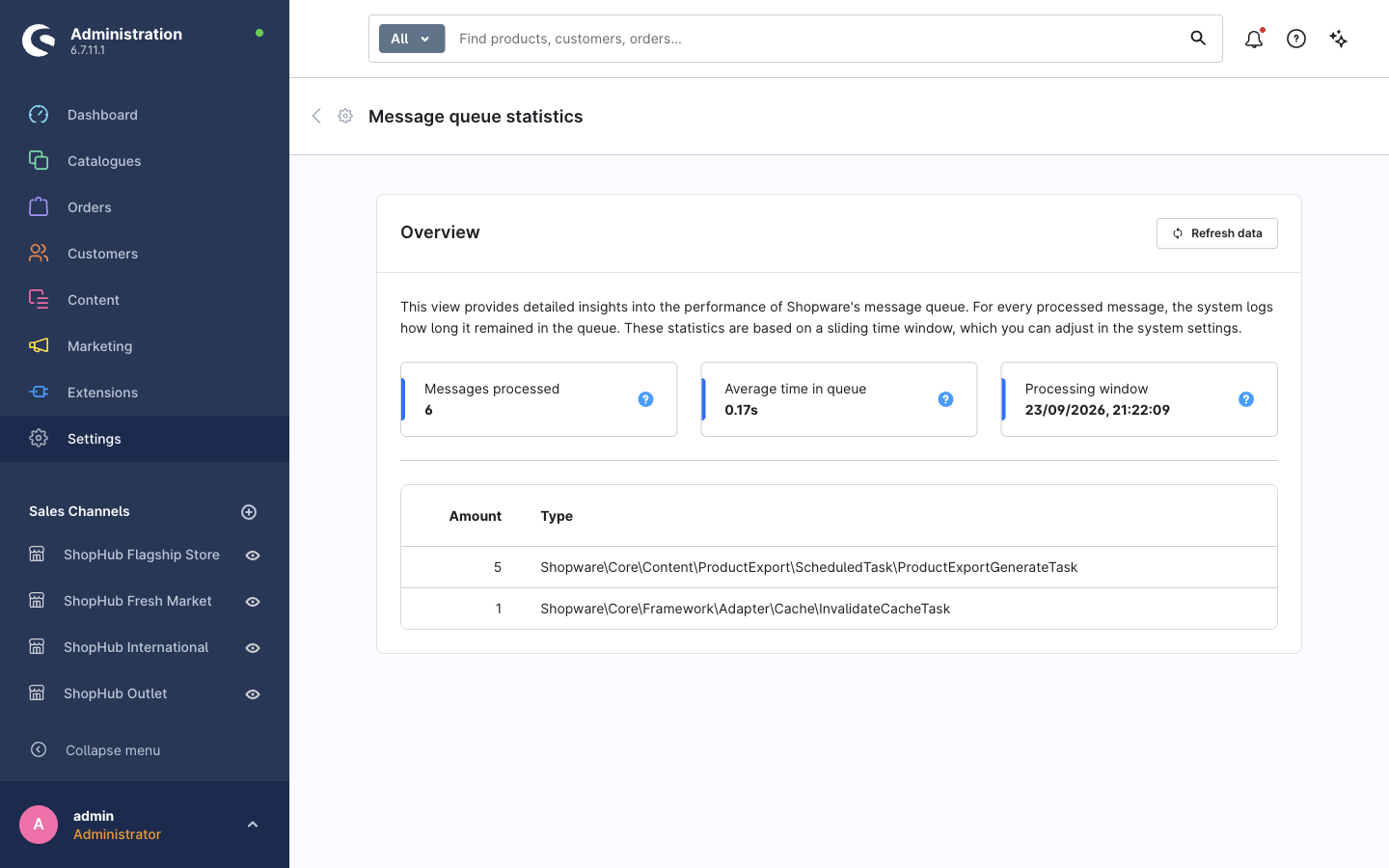
With the command line:
bin/console messenger:statsshows messages still waiting.
- Flow — is the flow active, does it contain Send SMS, and was the flow saved after adding it? Open the flow's Flow tab; to see which template the action uses, click ⋯ → Edit action on it. See Send SMS from a flow.
- Template — active, and filled in for the order's language? Log:
Skipping notification: template is inactive/template has no content for this language. - Phone number — log:
Skipping mobile channel: recipient has no phone number/recipient phone number is not usable. Open the order and look at its billing address: is there a phone number? If not, switch on the phone field under Settings → Log-in & sign-up so future customers are asked for one. Local numbers (starting with0) also need a Default country dial code. See Phone numbers & dial codes. - Provider configured for this sales channel — log:
No SMS provider is configured. All required fields of the provider card must be filled for that sales channel. - Provider refused — log:
Notification rejected by providerwith the reason: unapproved sender ID, invalid credentials, no credit. Not retried. - Failed after retries —
bin/console messenger:failed:show, thenmessenger:failed:retry <id>once fixed.
Test message errors
| Error | Fix |
|---|---|
| No provider is configured yet | Fill all required fields of one provider card for the selected sales channel. |
| The provider refused the message | Check sender ID approval, live (not sandbox) credentials, account credit. For Nigerian DND numbers on Termii set Carrier route to DND. |
| The provider is temporarily unavailable | Retry later; check the provider's status page. |
| That phone number is not usable | Use international format, e.g. +2348030000000. |
| The template could not be rendered | Fix the Twig placeholders in the message text. |
| This template has no message text for the selected language | Switch the content language and fill in the text. |
Customers are never asked for a phone number
Shopware's phone field is off by default. Switch on Show phone number (and Phone number field required) under Settings → Log-in & sign-up, per sales channel if needed — see Phone numbers & dial codes. The plugin's dial-code field only appears where Shopware shows a phone field.
A customer cannot submit a form: "Enter the number without the country code"
The customer typed the country code (e.g. +234…) into the number box. They should pick the country in the list and type only the rest of the number. See Phone numbers & dial codes.
Messages arrive twice
Duplicate deliveries of the same message are suppressed for 24 hours using the application cache; clearing the cache between a failed attempt and its retry can let one through. Two flows with Send SMS on the same event send two messages — check your flows.
Customers are billed several segments for a short message
A single non-GSM character (curly quote ’, emoji, some accented letters) switches the message to Unicode: 70 characters per segment instead of 160. The template editor shows the encoding.
Staff cannot open SMS templates
Known issue — see below. Only Administrator users can manage templates in 0.9.0-beta.1.
Delivery reports rejected (403)
Webhook signing secret is empty or differs from what Termii signs with. Only Termii's x-termii-signature header is supported.
Known issues
In version 0.9.0-beta.1:
| Issue | Impact | Workaround |
|---|---|---|
The role checkbox registers notifications.manage; screens and API require sms.manage. | Non-administrators cannot be given access to SMS templates. | Manage templates with an Administrator user. |
| The template Sender ID is stored but not used when sending. | Messages always use the provider's sender from the settings. | Set the sender per sales channel in the settings. |
| Delivery reports verify only Termii's signature header. | Reports from other providers are rejected. | — |
| The Send SMS action card in Flow Builder does not show which template it uses. | Hard to review flows at a glance. | Click ⋯ → Edit action on the action. |
| In the Send test message and Send SMS dialogs, the hint text overlaps the field label. | Cosmetic. | — |
The SMS templates list shows the technical name kommandhub_sms_template in its search bar, and has no Internal name column. | Cosmetic; templates are identified by their event. | — |
The repository README names the queue message NotificationsMessage; the class is SendSmsMessage. | Documentation only. | — |
Still stuck? Contact support with versions and log lines.