

Appearance
Address fields & phone check
For merchants
What your customers see in the storefront address forms, what is saved, and per-country address behaviour.
Address rules per country
The plugin does not add its own postal-code or state validation. The import sets Shopware's own country settings, and Shopware's forms follow them:
| Country | Effect in registration and address forms |
|---|---|
| Ghana | Postal code optional and its format not checked. |
| Nigeria | Postal code optional; the state field is shown at registration. |
| Other 24 countries | Unchanged — whatever is set under Settings → Shop → Countries. |
Whether the state field is required and how addresses are printed (the country's address format) stay Shopware settings under Settings → Shop → Countries → country. The extra fields below are not part of the printed address format.
Extra address fields
Switch: Features → Additive address fields, per storefront.
Four optional fields appear below the address in every storefront form that uses Shopware's standard address form — registration (billing and a separate shipping address, also for guest checkout), Account → Addresses (add and edit), and the address dialog in checkout:
| Field | Limit | Purpose |
|---|---|---|
| Nearest landmark | 255 characters | "Opposite the Total filling station" |
| Area / neighbourhood | 255 characters | |
| Digital address code | 255 characters | A code such as a GhanaPostGPS address. Stored as typed; not looked up or checked. |
| Directions | 65,535 characters | Free text for the courier |
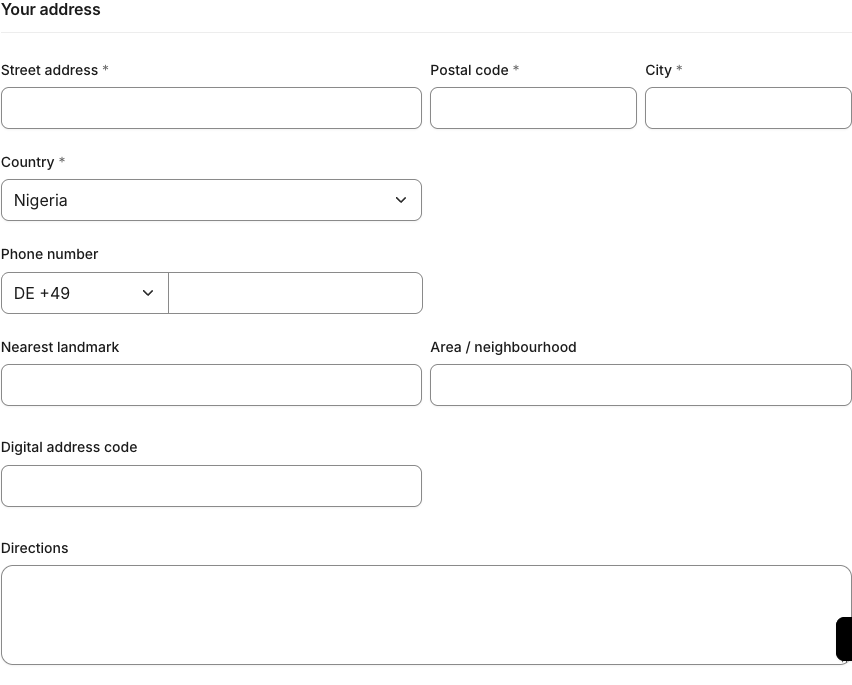
None is required. Longer input is rejected with Shopware's usual form error, before anything is saved.
Labels are translated for English, German and French storefronts. Change them under Settings → Shop → Snippets (keys kmhAf.address.*).
How values are saved
- Values are saved with the customer's address in the address book, once per address.
- Clearing a field and saving clears the stored value.
- A field that a form or app does not send at all keeps its stored value — for example when a headless client updates only the street.
- If the switch is off in a storefront, nothing is saved there; values saved earlier are kept and reappear when it is switched back on.
Where you can see the values
Not on the order, not in the Administration
In 0.1.0 the extra details belong to the customer's address book entry only. They are not copied to the order address, so they do not appear on the order, in order emails or on documents, and the Administration shows them nowhere. They can be read through the Admin API (customer address, association kmhAfData) — see Developer docs.
Customers see their saved values again when they edit the address under Account → Addresses.
Local division
Switches: Administrative-division hierarchy and Additive address fields, both on for the storefront — plus divisions in your shop (the Lagos sample after an import with the hierarchy on).
A Local division drop-down (Select a division (optional)) appears with the extra fields. It stays hidden until the customer picks a state that has divisions, then lists them, lower tiers indented:
text
Eti-Osa
Ikeja
— Alausa
— Ojodu
Surulere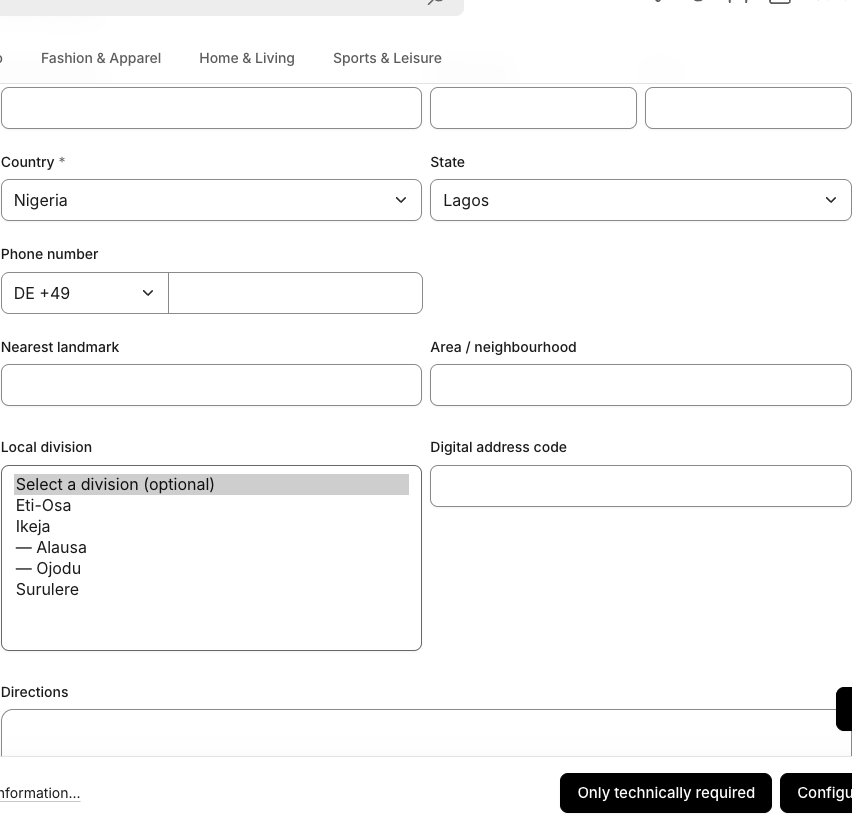
- Choosing a division is optional.
- Only divisions of the chosen state are accepted; any other value is saved as empty.
- Switching to a state without divisions hides the drop-down and clears the division on save.
- Division names follow the storefront language when a translation exists, otherwise the shop's default language.
Phone check
Switch: Features → Phone normalization, per storefront. The phone field itself must be on: Settings → Log-in & sign-up → Show phone number.
When the customer leaves the phone field, the plugin checks the number against the selected country (using Google's libphonenumber):
- Looks valid — the field turns green and the international form appears below it, for example
08030000000with Nigeria becomes+234 803 000 0000. - Does not look valid — the field turns red with This phone number doesn't look valid for the selected country. Please check it. (snippet
kmhAf.phone.invalid).

The check is advice only. It never blocks the form, and the number is saved exactly as the customer typed it — the plugin does not rewrite it to international format.
If no country is selected, no feedback is shown.