

Appearance
Delivery price rules
For merchants
Where: Settings → Shop → Delivery price rules. Needs the permission Last-Mile Delivery for Shopware 6 → Manage.
A price rule says: when the shipment looks like this, the delivery costs that much. Rules form an ordered list. For each Instant Delivery cart the plugin goes through the active rules from the highest priority down and uses the first rule that matches. That price is the base price; surcharges are added on top.
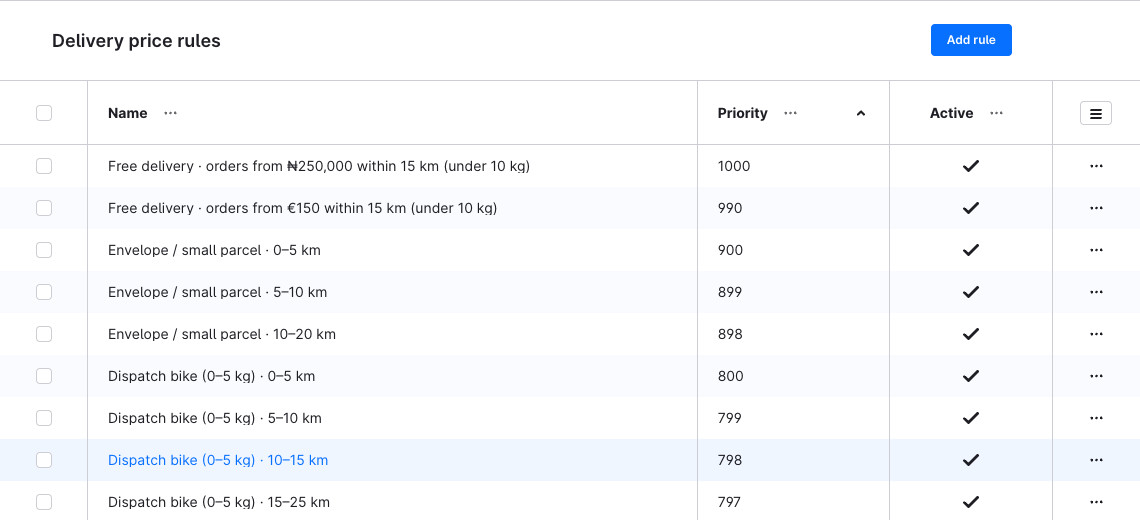
Create a rule
- Click Add rule.
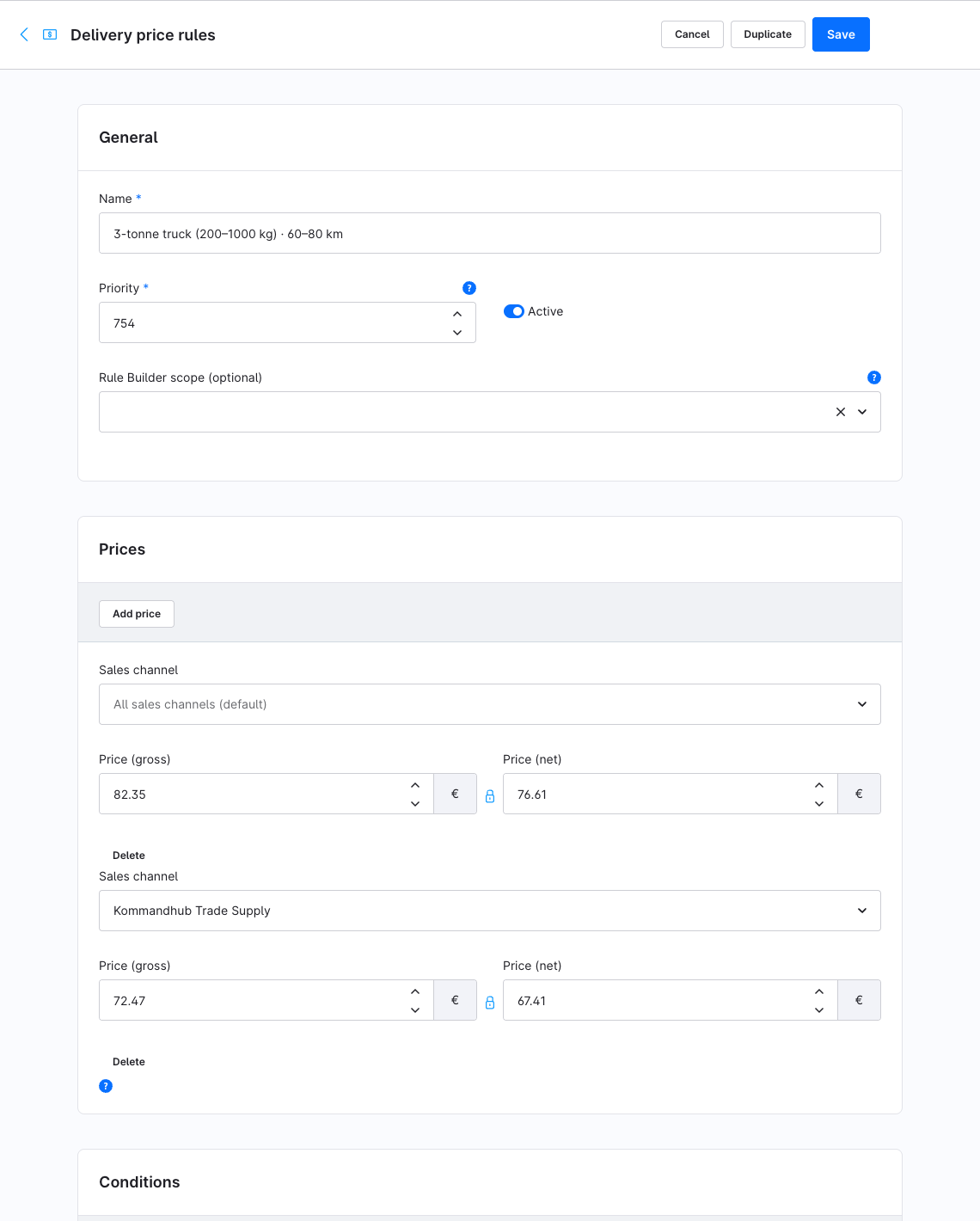
- General card:
- Name — for your team, e.g. City 0–20 km.
- Priority — rules are checked from high to low; the first match wins. Each active rule needs its own priority. A new rule starts at priority 0 and active, so give it a priority before saving if another active rule already uses 0.
- Active — only active rules are used.
- Rule Builder scope (optional) — a Shopware rule; the price rule then only applies when that rule is valid for the cart, e.g. a delivery zone, a category or a customer group.
- Prices card — the delivery price. See Prices.
- Conditions card — Add condition for each criterion, choose the Metric and enter From (inclusive) and/or To (exclusive). See Conditions.
- Click Save.
Conditions
All conditions of a rule must hold (they are combined with AND). A rule without conditions matches every shipment — useful as a low-priority fallback.
| Metric | How it is measured |
|---|---|
| Distance (km) | Driving distance from your fulfilment location to the delivery address — see Distance & map providers |
| Total weight (kg) | Product weight × quantity, summed over the cart |
| Volumetric weight (kg) | length × width × height (cm) ÷ Volumetric weight divisor × quantity, summed over the cart. Shopware stores dimensions in mm; the plugin converts them to cm |
| Chargeable weight (kg) | The larger of total weight and volumetric weight |
| Longest edge (cm) | The longest single dimension of any product in the cart |
| Item count | The sum of the quantities of all line items in the cart (including nested items and promotion lines) |
| Order value | The total of the line items, without shipping — gross for customers who see gross prices, net for those who see net prices |
Products without weight or dimensions count as 0 for those metrics.
Ranges include From and exclude To. Distance from 0 to 20 matches 19.99 km but not 20 km; a second rule from 20 to 50 takes over at exactly 20 km, so neighbouring bands never overlap. Leave From empty for "up to", To empty for "and above".
On save the plugin rejects:
| Message | Cause |
|---|---|
| Another active rule already uses this priority… | Two active rules with the same priority. The Priority field is marked. |
| A condition range is invalid: "To" must be greater than "From", and both must be zero or more. | To ≤ From, or a negative bound. |
| Each metric can only be used once per rule. | The same metric twice in one rule. |
| There is more than one price for the same sales channel. | Two price rows for the same sales channel, or two default rows. |
| A condition uses an unknown metric. | Only possible through the API. |
Prices
Each rule has one or more price rows:
- The row with an empty Sales channel (All sales channels (default)) applies to every storefront that has no row of its own.
- Add price adds a row; choose a Sales channel to give that storefront its own price. One row per sales channel.
The price field holds the price in your default currency. In another currency the default-currency price is converted with that currency's factor (Settings → Shop → Currencies). A price stored for that currency through the API takes precedence.
Customers who see net prices or are tax-free are charged the net value, everyone else the gross value. The result is rounded to the currency's decimal places and then taxed like any shipping method, following the tax type of Instant Delivery under Settings → Shop → Shipping (auto by default: taxed proportionally to the cart's line items).
A matching rule without a price blocks checkout
If the first matching rule has no price row for the storefront (no row of its own and no default row), the plugin does not try lower rules: checkout shows Instant Delivery is not available for your address…. Give every rule a default row.
Duplicate a rule
Duplicate — in the row's ⋯ menu in the list, or the button at the top of the rule — copies the rule with its conditions and prices. The copy is named … (Copy) (or (Copy 2), …) and is inactive, so it can't clash with the original's priority. Set a new priority and switch it active.
Example: distance bands with a fallback
| Priority | Name | Conditions | Price |
|---|---|---|---|
| 30 | Bulky, any distance | Longest edge from 120 | 25.00 |
| 20 | City | Distance from 0 to 20 | 5.00 |
| 10 | Region | Distance from 20 to 60 | 12.00 |
A 15 km order with a 150 cm parcel costs 25.00 (priority 30 matches first). A 70 km order matches no rule: checkout shows Instant Delivery is not available for your address… and the customer picks another shipping method. To serve everyone, add a lowest-priority rule without conditions.
For extra charges that should add up instead of replacing the price — bulky, peak hour, fuel — use surcharges.