

Appearance
Installation
For merchants
Requirements
- Shopware 6.7 (not 6.6), PHP 8.2+.
- A message queue worker running on the server. Switching a warehouse on or off recalculates its products in the background. Without a worker, product stock keeps the old totals. See Shopware: Message queue.
- A database backup. Installation adds four tables.
1. Install the plugin
Warehouse Stock is proprietary and not available from Packagist.
Option A — ZIP upload
- Get the release ZIP from KommandHub.
- Extensions → My extensions → Upload extension (Shopware: My extensions), select the ZIP.
Option B — Composer from the repository
Requires read access to the repository. Add it to your project's composer.json:
jsonc
"repositories": [
  { "type": "vcs", "url": "https://github.com/KommandHub-Org/KmhWarehouseStockSW.git" }
]
Then require a released version:
bash
composer require "kommandhub/warehouse-stock-sw:^0.4"For a private repository, give Composer a GitHub token with read access: composer config --global github-oauth.github.com <token> (never commit it). Background: Shopware: extension management.
2. Activate
bash
bin/console plugin:refresh
bin/console plugin:install --activate KmhWarehouseStockSW
bin/console cache:clear
Or in the Administration: Extensions → My extensions, find Warehouse Stock for Shopware 6, click Install and switch it active. Once active, Configure on the same row opens its settings.

Installing creates:
| What | Details |
|---|---|
| Tables | kmh_warehouse, kmh_warehouse_translation, kmh_warehouse_stock, kmh_warehouse_allocation |
| Administration | Settings → Warehouses, the Warehouse stock card on products, a Warehouse stock column in the product list |
| Storefront | The Stock by warehouse list on the product page |
| Permissions | Warehouses and Warehouse stock in roles, under Catalogues |
No warehouses are created. Nothing changes for your products until you enter warehouse quantities.
Parent products
Once the plugin is active, the Stock field of every product with variants is read-only. Customers buy variants, and each variant keeps its own stock. See Stock per product.
3. Make sure the queue is processed
Your developer or host keeps a worker running, for example with Supervisor or systemd:
bash
bin/console messenger:consume async --time-limit=300 --memory-limit=512MFor testing only, a browser tab with the Administration open also works through the queue.
4. Verify
- Settings → Warehouses → Add warehouse. Create two warehouses with positions
1and2. See Warehouses. - Open a product without variants. In the Warehouse stock card enter
3and5, and click Save. The Stock field now shows8and is read-only. - In the storefront, open the product. Below the delivery information you see Stock by warehouse with both warehouses.
- Order 4 pieces. Back in the Administration, the first warehouse shows
0and the second4. - Cancel the order. The quantities go back to
3and5.
Permissions
Staff need these permissions in their role (Settings → Users & permissions → Roles, category Catalogues). See Shopware: Users & permissions.
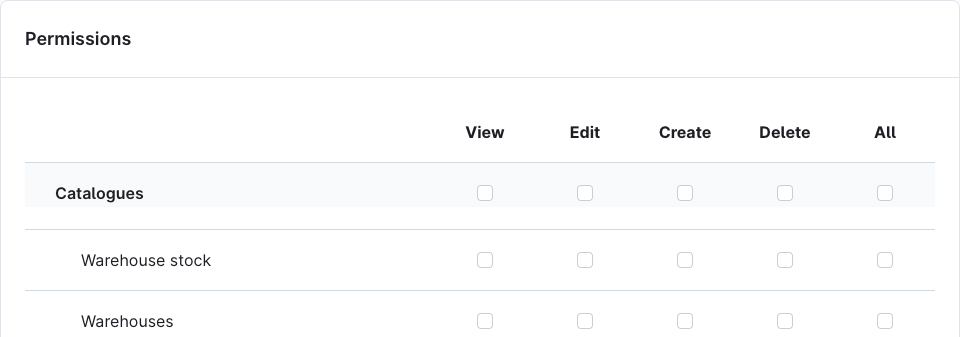
| Permission | Viewer | Editor | Creator | Deleter |
|---|---|---|---|---|
| Warehouses | See Settings → Warehouses | Change warehouses | Add warehouses | Delete warehouses |
| Warehouse stock | See the Warehouse stock card and product list column | Change existing quantities | Enter a quantity for a warehouse that has none yet | Delete stock rows (API only) |
- Warehouse stock → Viewer needs Product → Viewer. Editor needs Product → Editor, because quantities are saved with the product.
- Without Warehouse stock → Viewer, the card and the list column are hidden. The Stock field is still read-only for products that have warehouse quantities.
Updating
bash
composer update kommandhub/warehouse-stock-sw     # or upload the new ZIP
bin/console plugin:refresh
bin/console plugin:update KmhWarehouseStockSW
bin/console cache:clear
ZIP installs: upload the new ZIP under Extensions → My extensions → Upload extension, then click Update. Warehouses, quantities and settings are kept.
Deactivating
While the plugin is deactivated, orders change only the product Stock, not the warehouse quantities. After you activate it again, re-import the quantities from your ERP or check them in the Administration.
Uninstalling
Extensions → My extensions → ⋯ → Uninstall, or bin/console plugin:uninstall KmhWarehouseStockSW.
- With keep plugin data, all tables stay.
- Without it, the four tables are dropped: all warehouses, quantities and the record of which order took what from where are deleted permanently.
- Product Stock keeps its last calculated value in both cases. It is not reset.